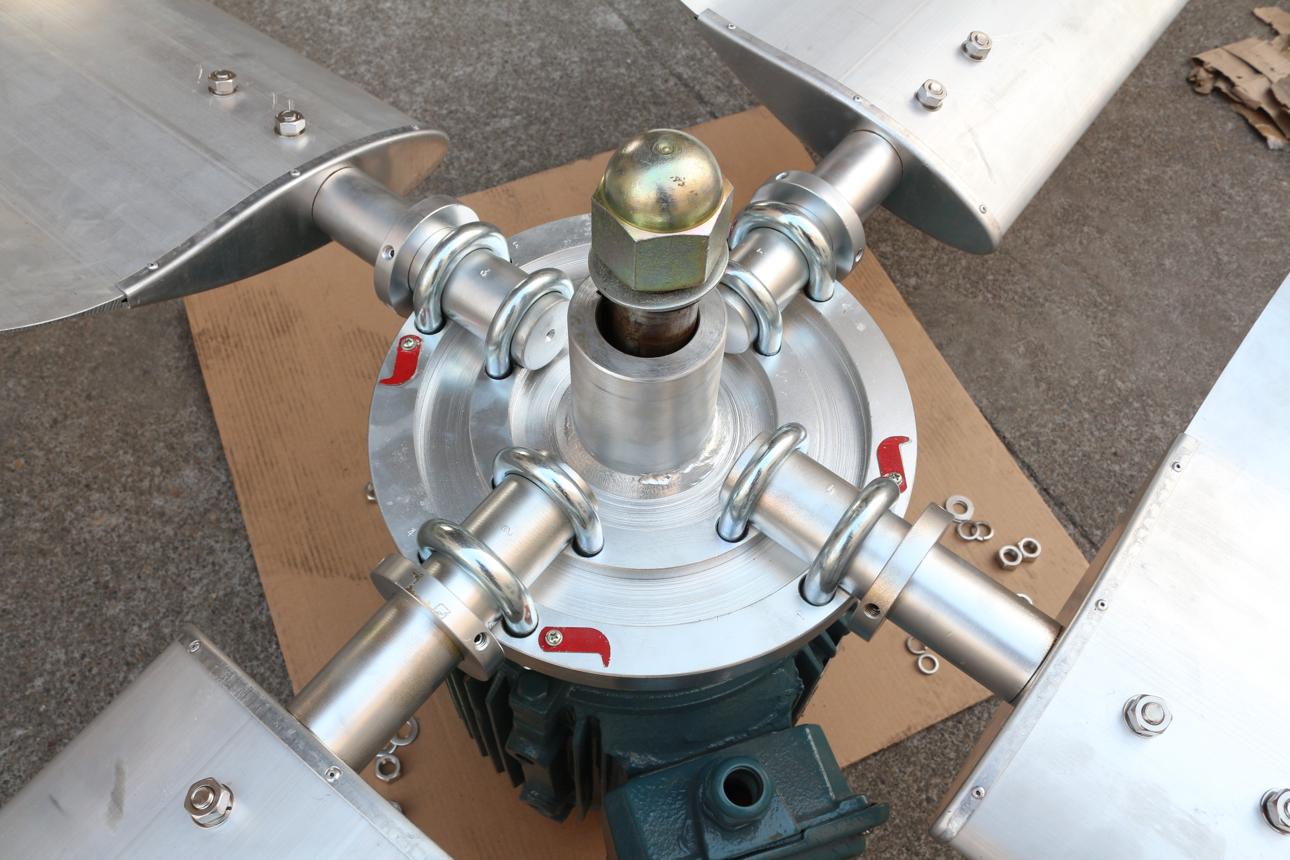
Cooling tower fan blade pitch adjustment is essential for maintaining proper airflow, cooling performance, and energy efficiency in industrial cooling systems. The blade pitch angle affects how much air the fan moves through the cooling tower, how much power the motor consumes, and how efficiently the tower removes heat from circulating water.
Incorrect fan blade settings can lead to insufficient airflow, excessive motor current, abnormal vibration, unusual noise, and increased operating costs. However, these symptoms can also result from other mechanical or system problems.
This troubleshooting guide explains how to identify common cooling tower fan blade pitch problems, determine their possible causes, and apply appropriate corrective actions to improve cooling tower performance.
1. Understanding Cooling Tower Fan Blade Pitch
Cooling tower fan blade pitch is the angle at which a blade is positioned relative to a defined reference plane. In axial-flow cooling tower fans, pitch influences airflow and aerodynamic loading.
A blade pitch angle that is too low may produce insufficient airflow. An angle that is too high may increase fan power demand and motor loading beyond the intended operating range.
The correct pitch depends on:
Fan diameter and blade design
Fan rotational speed
Motor power and operating limits
Cooling tower airflow requirements
System resistance and operating conditions
Manufacturer specifications
There is no universal pitch angle for all cooling tower fans. Always use the approved setting and measurement method for the specific fan model.
2. Common Cooling Tower Fan Blade Pitch Problems
2.1 Insufficient Airflow
Symptoms: The cooling tower struggles to maintain the required cold-water temperature, especially during periods of high heat load.
Possible causes:
Fan blade pitch is below the recommended setting.
The fan rotates in the wrong direction.
Fan speed is lower than specified.
Air inlets or fill media are blocked.
Fan blades are damaged or incorrectly installed.
Troubleshooting steps:
First, check fan rotation and speed. Next, inspect the air inlet, fill media, and fan blades. Measure the blade pitch using the manufacturer's recommended procedure and compare the readings with the approved target.
If the pitch is too low, adjust it according to the manufacturer's instructions. Do not increase the angle without checking motor capacity and fan operating limits.
2.2 Excessive Motor Current
Symptoms: Motor current is higher than normal, the motor becomes unusually hot, or overload protection trips repeatedly.
Possible causes:
Fan blade pitch is too high.
Fan speed exceeds the design specification.
Bearings or gearbox components have excessive friction.
Electrical supply conditions are abnormal.
Fan components are damaged or obstructed.
Troubleshooting steps:
Record the motor current and compare it with the motor nameplate rating and historical operating data. Verify fan speed and inspect the drive system.
If the blade pitch was recently changed, check whether the setting exceeds the manufacturer's recommendation. Correct the pitch if necessary and recheck motor loading under comparable operating conditions.
Never repeatedly reset an overloaded motor without identifying the cause.
2.3 Abnormal Vibration
Symptoms: The fan assembly vibrates excessively, the tower structure shakes, or vibration levels increase after maintenance.
Possible causes:
Uneven blade pitch angles
Loose blade fasteners
Damaged or deformed blades
Fan imbalance
Hub misalignment
Worn bearings or gearbox problems
Troubleshooting steps:
Shut down and isolate the fan before inspection. Measure each blade angle at the same specified radial position. Check blade fasteners, hub condition, and visible damage.
If pitch settings are consistent but vibration remains high, arrange a mechanical inspection and balancing assessment as appropriate. Blade pitch adjustment alone may not resolve a mechanical imbalance.
2.4 Uneven Blade Angles
Symptoms: Measurements show that individual blades have different pitch angles.
Possible causes:
Incorrect adjustment during installation
Inconsistent measuring positions
Improper blade seating
Worn or damaged adjustment hardware
Incorrect replacement blades
Troubleshooting steps:
Confirm that the measuring tool is correctly positioned and that every blade is measured using the same reference plane and radius.
Compare the results with the manufacturer's target and permitted blade-to-blade variation. Correct any out-of-tolerance settings using the approved adjustment procedure.
Do not assume that visual alignment alone confirms correct pitch.
2.5 Unusual Noise
Symptoms: The fan produces more airflow noise than usual, or unusual noise occurs together with vibration.
Possible causes:
Troubleshooting steps:
Stop the fan if the noise is sudden, severe, or suggests mechanical contact. After proper isolation, inspect the blades, hub, clearances, and drive components.
If the noise began immediately after pitch adjustment, verify the blade settings and fastener installation before returning the fan to service.
2.6 Poor Energy Efficiency
Symptoms: Electricity consumption increases without a corresponding improvement in cooling performance.
Possible causes:
Excessive blade pitch
Incorrect fan speed
Unnecessary fan operation
Dirty fill or restricted airflow
Poor water distribution
Changes in process heat load or weather conditions
Troubleshooting steps:
Compare fan power consumption, airflow, water temperatures, and operating conditions with historical records. Check whether the fan is meeting the required cooling duty.
Adjust the pitch only if measurements confirm that it is outside the approved range. The goal is to meet cooling requirements without exceeding motor and fan operating limits.
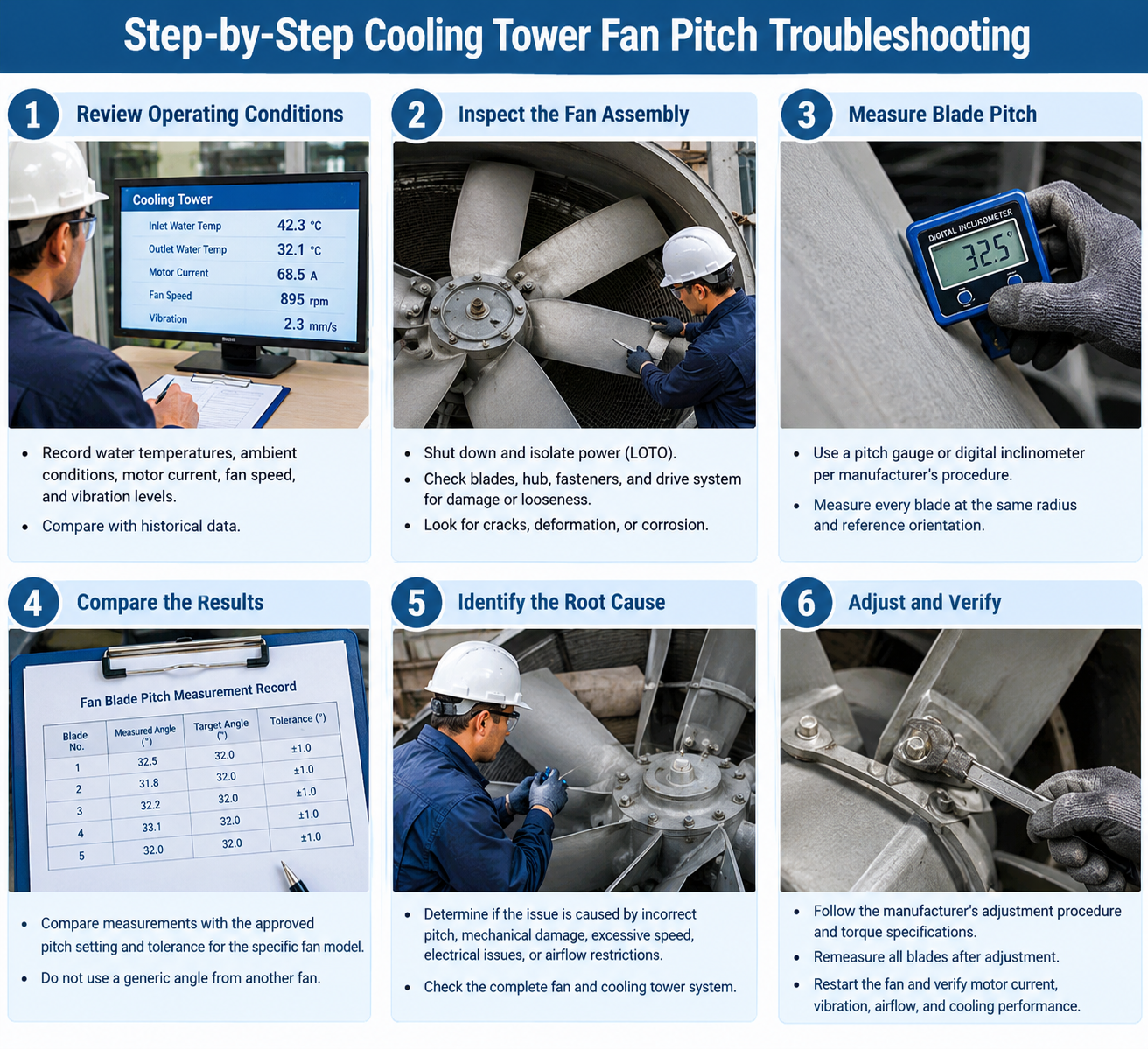
3. Step-by-Step Cooling Tower Fan Pitch Troubleshooting
Follow a systematic process to identify the root cause rather than adjusting the blades unnecessarily.
Step 1: Review Operating Conditions
Record cooling-water inlet and outlet temperatures, ambient wet-bulb temperature, motor current, fan speed, and vibration readings. These values help establish whether the problem is related to airflow, electrical loading, or overall tower performance.
Step 2: Inspect the Fan Assembly
Shut down the equipment, isolate the power supply, and follow lockout/tagout (LOTO) procedures. Inspect blades, hubs, fasteners, and the drive system for damage or looseness.
Step 3: Measure Blade Pitch
Use a suitable pitch gauge or digital inclinometer according to the manufacturer's procedure. Measure every blade at the same specified radius and reference orientation.
Step 4: Compare the Results
Compare the measurements with the approved pitch setting and tolerance for the installed fan model. Do not use a generic angle from another fan as a reference.
Step 5: Identify the Root Cause
Determine whether the problem is caused by incorrect pitch, mechanical damage, excessive fan speed, electrical issues, airflow restrictions, or water distribution problems.
Step 6: Adjust and Verify
If pitch correction is required, follow the manufacturer's adjustment sequence and tightening specifications. Remeasure every blade after adjustment.
Once the fan is safely returned to operation, verify motor current, vibration, airflow, and cooling performance. Stop the equipment if abnormal conditions persist.
4. Cooling Tower Fan Blade Pitch Troubleshooting Table
| Problem | Possible pitch-related cause | Recommended action |
| Low cooling capacity | Pitch too low | Verify airflow and adjust to the approved setting if required |
| High motor current | Pitch too high | Check pitch, speed, and motor operating limits |
| Excessive vibration | Uneven blade settings | Measure all blades and inspect the hub |
| Uneven pitch readings | Incorrect installation or measurement | Standardize measurement and correct out-of-tolerance settings |
| Increased fan noise | Incorrect pitch or blade interference | Inspect blades, clearances, and fasteners |
| High energy consumption | Excessive loading or poor system performance | Check pitch, speed, and overall cooling tower condition |
5. Preventive Maintenance for Cooling Tower Fan Pitch
Preventive maintenance helps minimize fan performance problems and unplanned downtime.
Check pitch after installation: Verify all blade angles before commissioning.
Inspect after blade replacement: Confirm that replacement blades meet the fan's specifications.
Monitor motor current: Investigate unusual changes in electrical loading.
Record vibration levels: Compare readings over time to identify developing faults.
Inspect fasteners and hubs: Follow the manufacturer's inspection and torque requirements.
Maintain airflow paths: Clean air inlets and inspect fill media and drift eliminators.
Keep maintenance records: Document blade angles, operating conditions, adjustments, and inspection results.
A consistent maintenance history helps technicians distinguish normal operating changes from developing mechanical problems.
6. Frequently Asked Questions
What Is the Correct Cooling Tower Fan Blade Pitch Angle?
The correct angle depends on the fan design, blade geometry, rotational speed, and operating requirements. Use the manufacturer's specifications for the exact model.
Can Incorrect Blade Pitch Cause Motor Overload?
Yes. Excessive pitch can increase aerodynamic loading and power demand, potentially causing high motor current or overload trips. Other electrical and mechanical causes should also be investigated.
Why Does a Cooling Tower Vibrate After Pitch Adjustment?
Possible causes include uneven blade angles, loose fasteners, incorrect blade installation, mechanical imbalance, or hub problems. Stop the fan if vibration is excessive and inspect it safely before restarting.
Should I Increase Blade Pitch to Improve Cooling?
Not automatically. First verify fan rotation, speed, airflow restrictions, water distribution, and actual blade settings. Increasing pitch without checking motor limits can cause excessive loading.
How Often Should Fan Blade Pitch Be Checked?
Check pitch during commissioning, scheduled maintenance, blade replacement, and troubleshooting after abnormal vibration or cooling performance changes. Follow the inspection frequency recommended by the manufacturer.
Conclusion
Cooling tower fan blade pitch adjustment is an important part of troubleshooting airflow, motor loading, vibration, and energy consumption problems. By measuring blade angles consistently, comparing them with manufacturer specifications, and checking the complete fan and cooling tower system, maintenance teams can identify the real cause of performance issues.
For industrial cooling tower repairs and retrofit projects, always verify fan compatibility, approved pitch settings, motor capacity, and fastener requirements before making adjustments. Accurate measurement and preventive maintenance help improve reliability, maintain cooling performance, and control operating costs.
Recommended internal links for CoolingTowerPart.com:


